Welcome to Yamoxy
Yamoxy keeps children safer online. It blocks unwanted websites on the whole Mac, in every browser. Everything stays on your Mac.
Formerly KidSafe. Yamoxy blends yamori (家守), Japanese for “guardian of the house” (also the name of the gecko), and proxy, the relay your browsing goes through.
Install
Two minutes. Nothing else to install: the Privoxy filter is included.
- Open
Yamoxy.dmg. Drag Yamoxy onto Applications. - Open Yamoxy from Applications.
- macOS asks to confirm: click Open. Yamoxy is signed and checked by Apple.
- Done. A gecko appears at the top right of the screen.
The menu bar
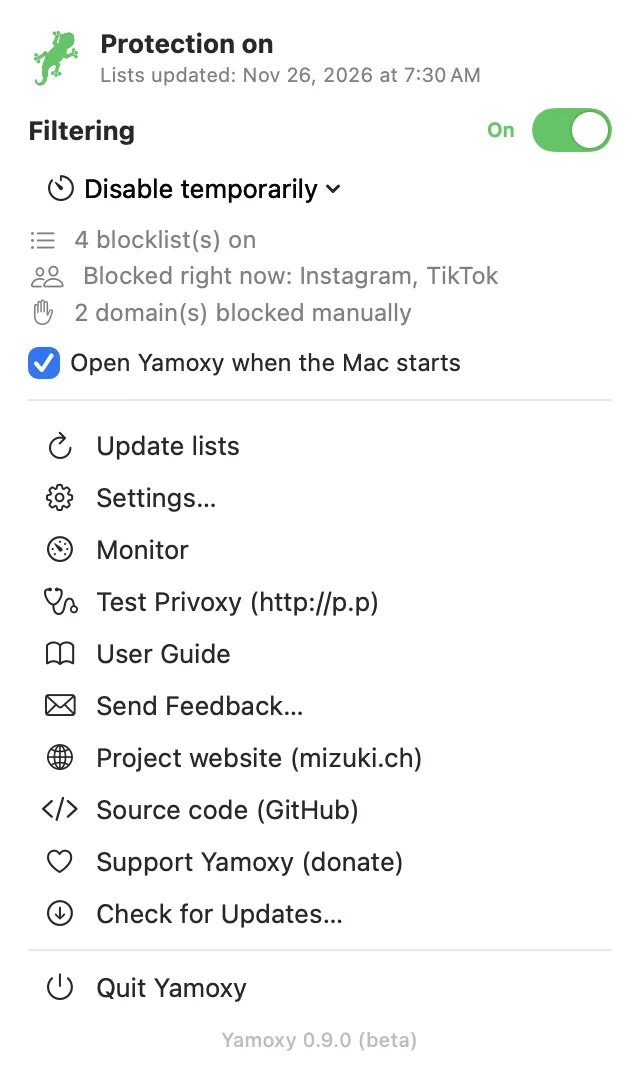
Everything starts from the gecko, at the top right of the screen: bright when filtering is on, greyed out when it is off.
Status
- Green: protection on.
- Orange: protection incomplete. The reason shows, with a button to fix it.
Filtering
The switch pauses filtering: nothing is blocked, and Privoxy shows “disabled” on http://p.p. Nothing is deleted. One click resumes it.
Disable temporarily: 30 seconds, 1, 5 or 15 minutes, or 1 hour. The menu shows the time left, then filtering resumes on its own. If a parent password is set, it is required.
Shortcuts
- Update lists
- Settings, monitor, this guide
- Test Privoxy: checks the browser goes through the filter
- Send feedback, donate, quit
Block categories
Lists tab. Tick a box, it applies within seconds.
- By topic: adult content, ads and tracking, scams and malware, bypass tools (VPNs, proxies, encrypted DNS). Each topic offers one or more lists; at first, only HaGeZi NSFW is ticked.
- Level (HaGeZi Pro, HaGeZi Threat Intelligence Feeds): Light, Normal or Strong. The higher the level, the more the list blocks, with a slightly higher chance of blocking a site by mistake.
- ⓘ: the list's information sheet.
- 🐢 Tortoise: very large list (full UT1, security at the Strong level). It may slow browsing.
- Add a list: More topics (gambling, violence, drugs, dating, social networks, online games, illegal downloads, URL shorteners), Other free lists (StevenBlack, EasyList, AdGuard DNS filter…), a web address or a file on your Mac. Remove an added list with the trash can.
example.com also blocks www.example.com and all its subdomains.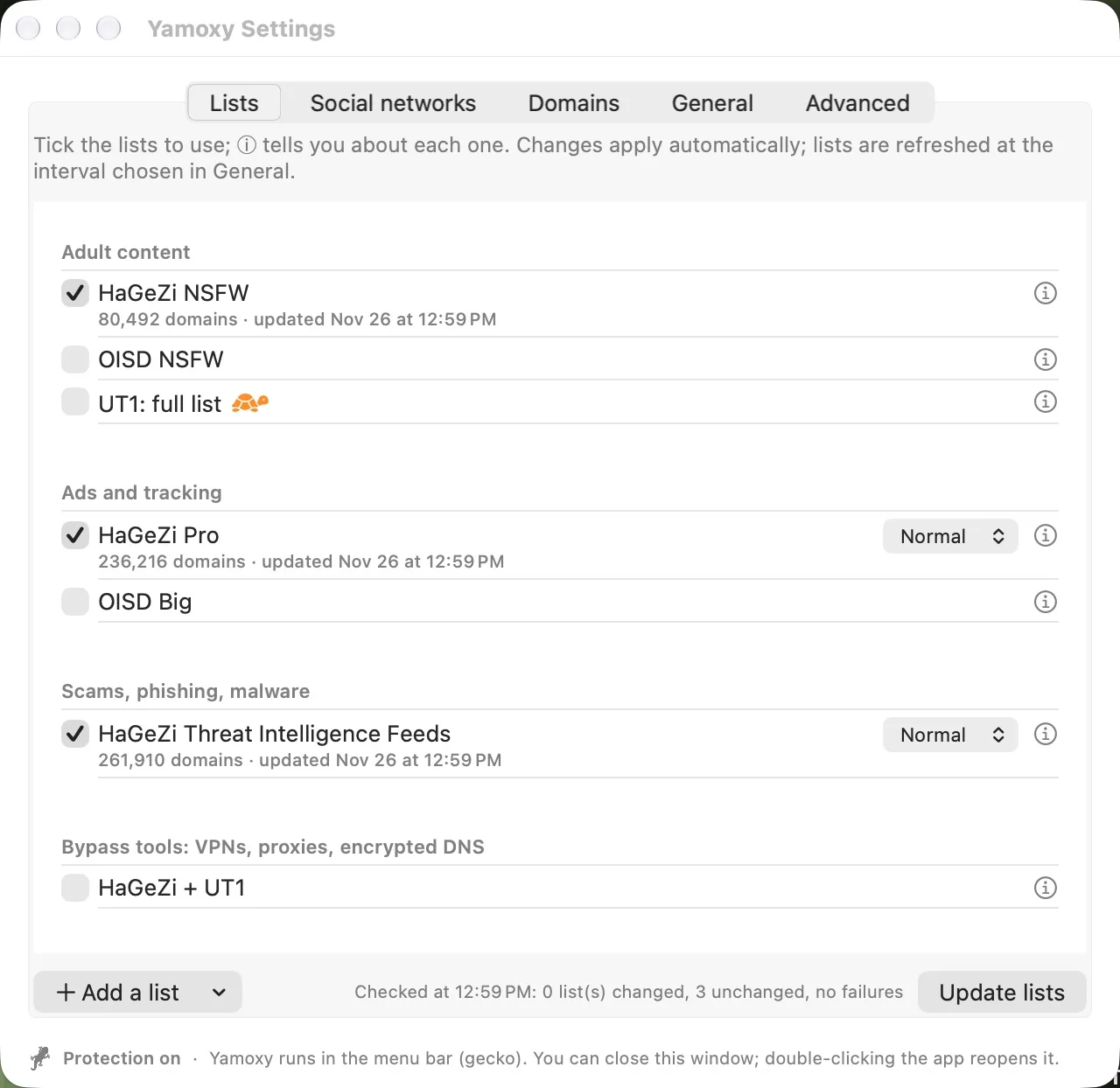
Which list to choose?
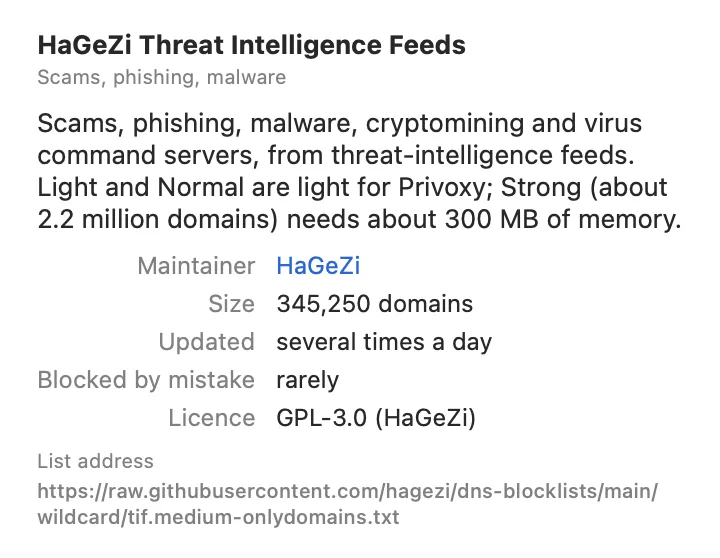
The ⓘ sheet shows who maintains the list, what it blocks, its size, how often its author updates it, how often it blocks by mistake, its licence and its address.
- HaGeZi
- Updated several times a day. Today's reference, with few mistakes: a good choice for every topic.
- OISD
- Updated every hour. Known for not breaking anything; complements HaGeZi.
- UT1
- Updated every day by Université Toulouse Capitole, used in French schools. The only one covering topics such as violence or drugs.
Two lists of the same topic complement each other but largely overlap: one is often enough.
Updating lists
Automatic, at the interval chosen in General (counted from the last update, while Yamoxy is open), or right away with Update lists. During the update, each list shows its step: downloading, converting to Privoxy's format, replacing in Privoxy.
- updated…
- Last successful update, with the number of domains added or removed if it changed. Hover: when the content last changed.
- In orange
- Download failed: the previous copy is still used, so the child stays protected. Hover to see why.
At the bottom of the tab, a summary: lists changed, unchanged, failed. An unchanged list isn't downloaded again: the website just confirms it hasn't changed.
When a site is blocked
What the child sees, and how Yamoxy explains it.
Almost all sites are encrypted (https://). The browser then doesn't show Yamoxy's page, but its own error message. That's expected: the site is blocked.
| Browser | Message |
|---|---|
| Firefox | “The proxy server is refusing connections” |
| Chrome, Edge, Brave | ERR_TUNNEL_CONNECTION_FAILED |
| Safari | “Safari can't open the page” |
Unencrypted site (http://) | Privoxy's “Request blocked” page |
Yamoxy's message
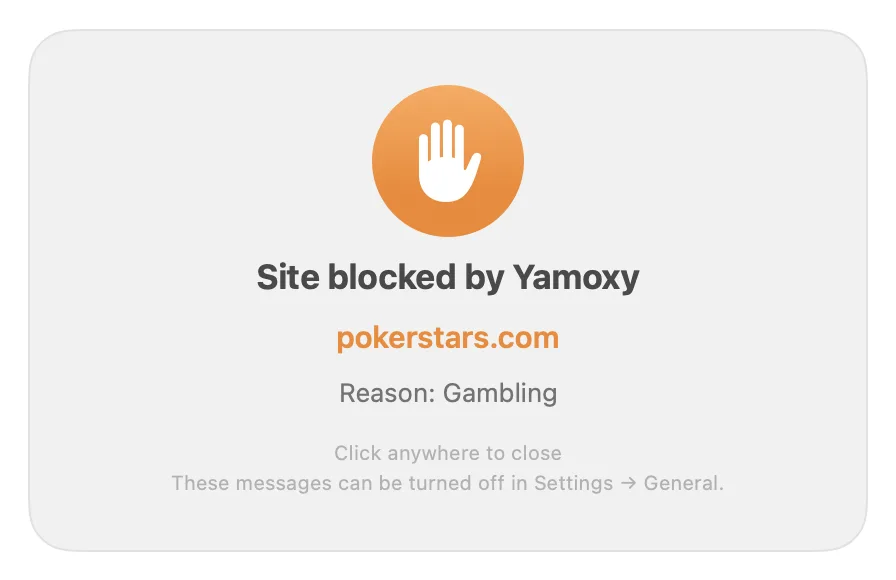
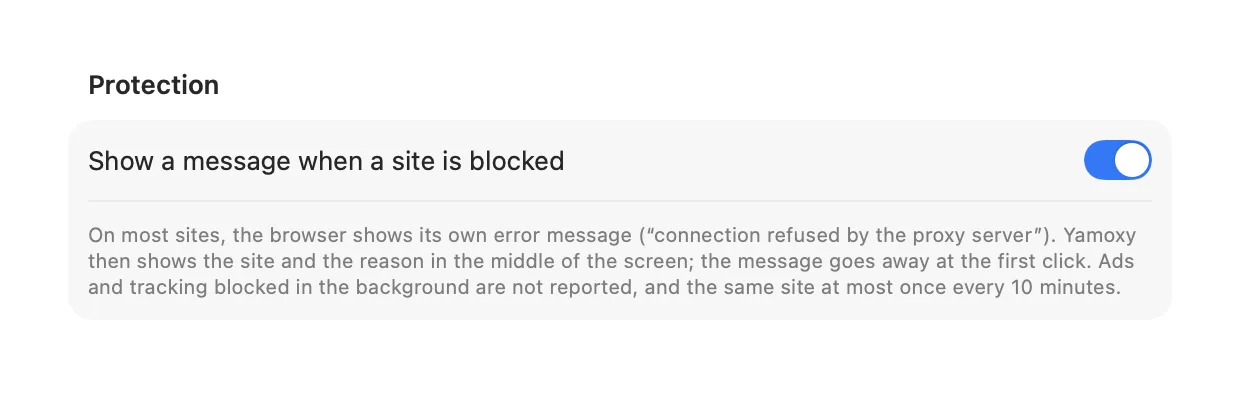
At the same time, Yamoxy shows the site and the reason in the middle of the screen, whatever the browser. The message goes away at the first click.
Ads and tracking blocked in the background are not reported. The same site is reported at most once every 10 minutes.
Turning the message off
Settings → General → uncheck Show a message when a site is blocked.
Sites stay blocked; only the message goes away. If a parent password is set, it is required.
Block or allow a site
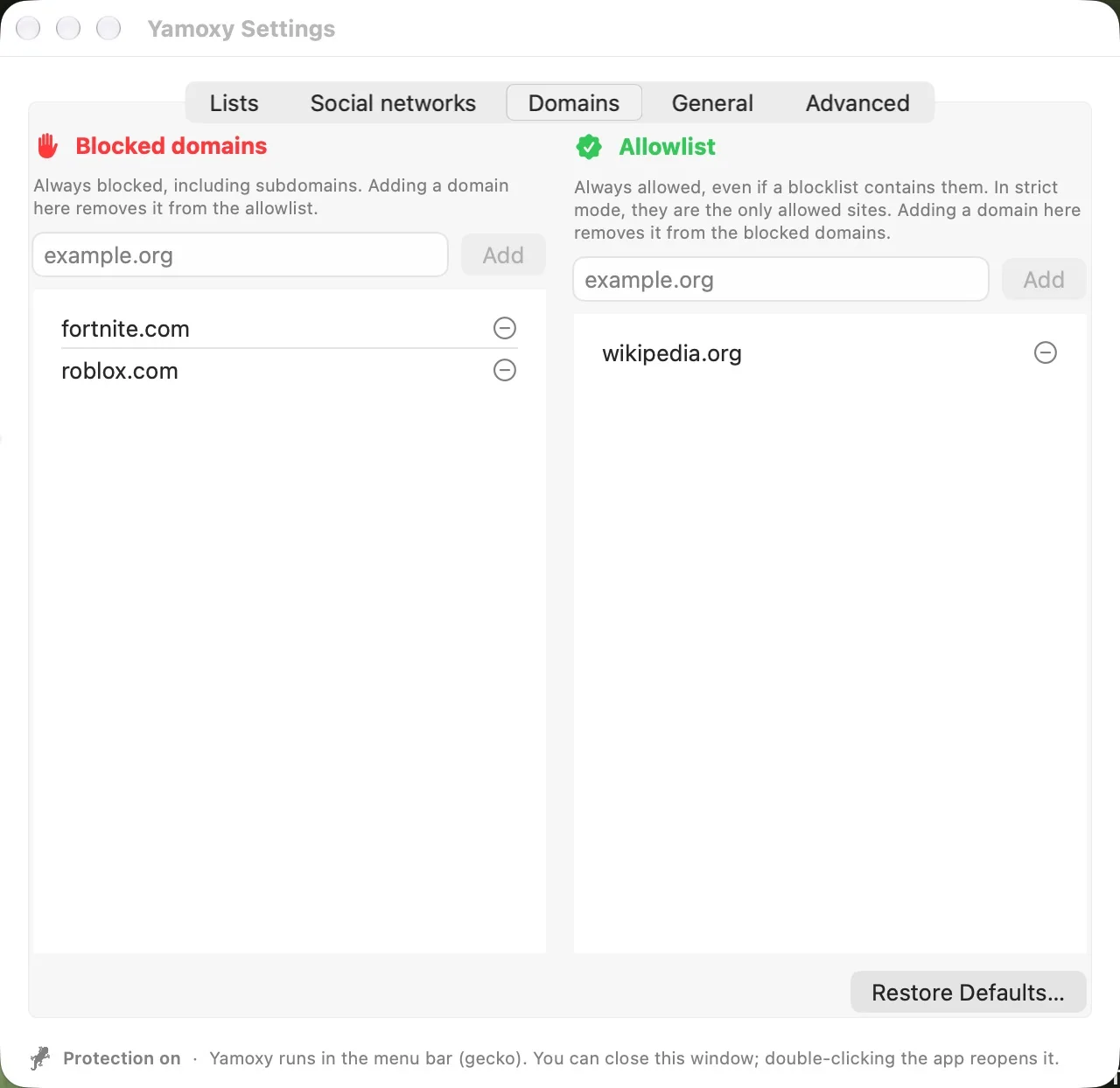
Domains tab. Two columns.
- Blocked domains: blocked at all times.
- Allowlist: always allowed, even if a list contains them. Ideal to unblock a site blocked by mistake.
Paste a full address: Yamoxy keeps only the domain.
General settings
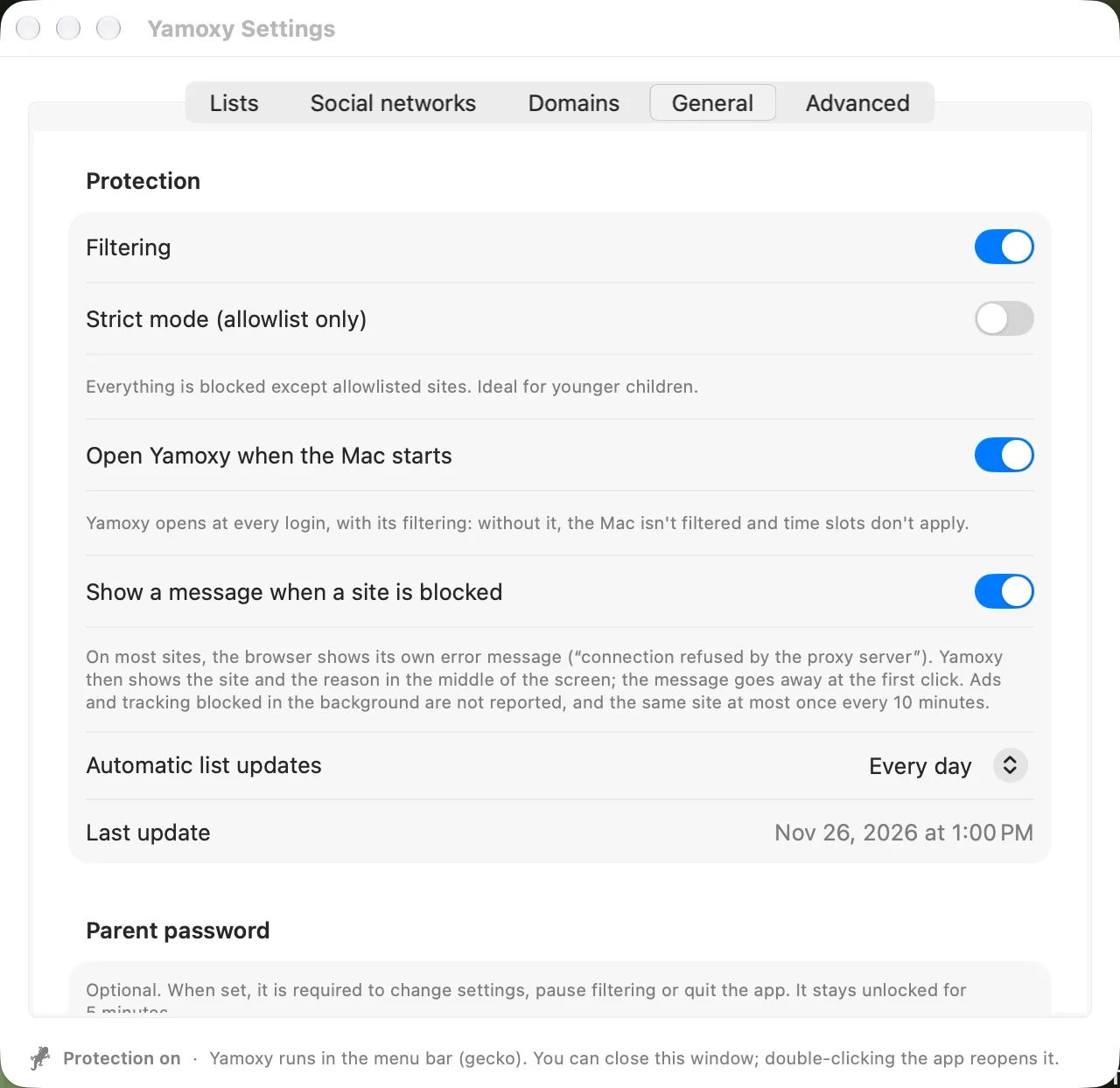
General tab.
- Strict mode
- Everything blocked, except the allowlist. For younger children.
- List updates
- From never to every week. Default: every day.
- Parent password
- Protects settings, pausing and Quit.
- Blocked site
- An on-screen message shows the site and the reason. The same site at most once every 10 minutes.
- Language
- System, Français or English.
Protection against workarounds
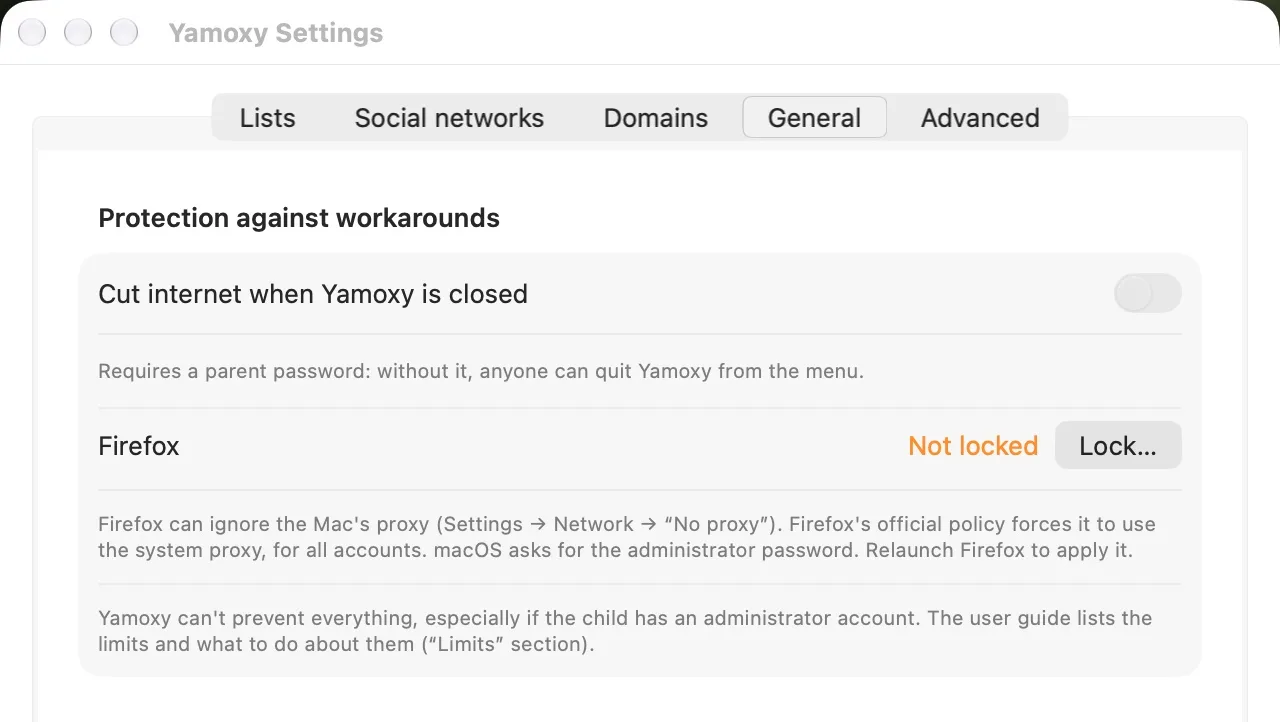
Offered when you create the parent password, and can be changed later in the General tab. Parent password required.
- Cut internet when Yamoxy is closed
- If Yamoxy is closed without the password (open at login turned off, log out, force quit), no site opens, instead of unfiltered access. To restore internet: open Yamoxy again, or Quit with the password.
- Firefox
- Firefox can ignore the Mac's proxy. Lock… installs Firefox's official policy: it always uses the system proxy, for all accounts. macOS asks for the administrator password. Relaunch Firefox; the policy shows at
about:policies.
Yamoxy updates
Yamoxy checks for new versions every week. It can install them by itself: download, check, relaunch. Your settings stay.
The monitor
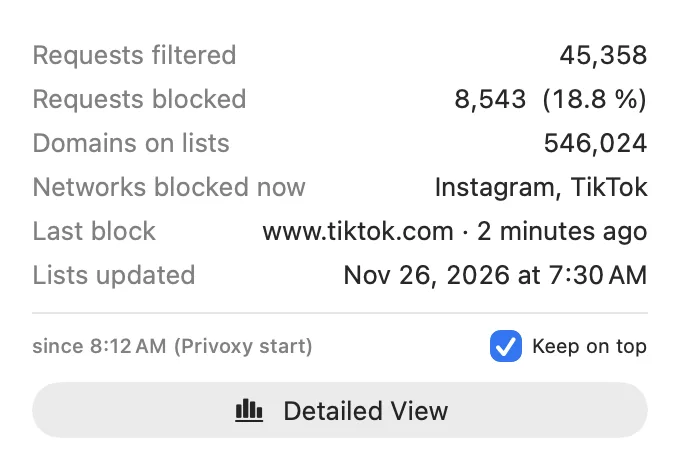
Menu → Monitor. A small window with key figures.
- Requests filtered and blocked
- Domains on lists
- Networks blocked now
- Last block
- Events: Yamoxy stopped unexpectedly, open at login turned off
Counters restart from zero when Privoxy restarts.
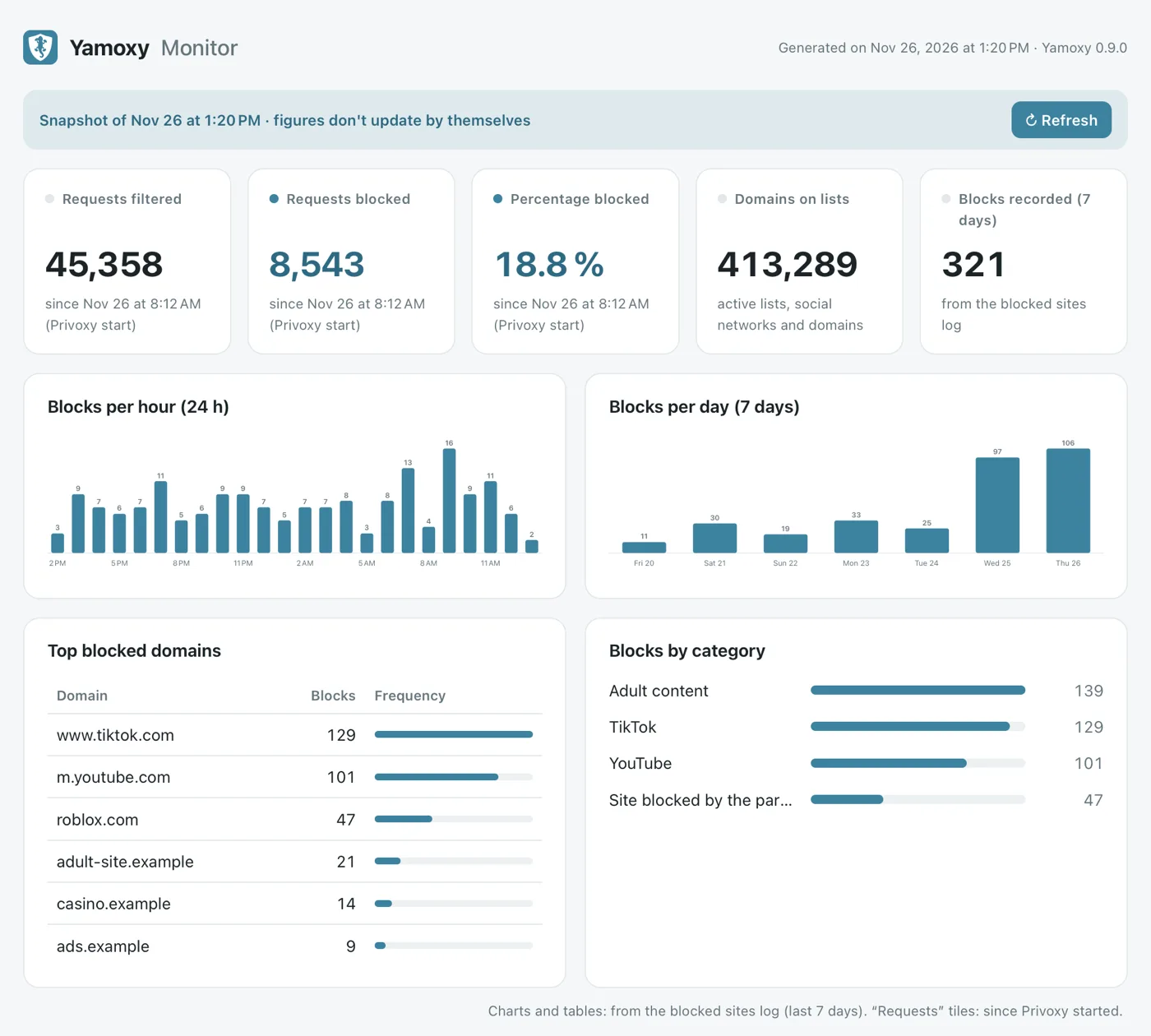
Detailed view
A local page with charts and tables: blocks per hour and per day, top blocked sites, categories, events.
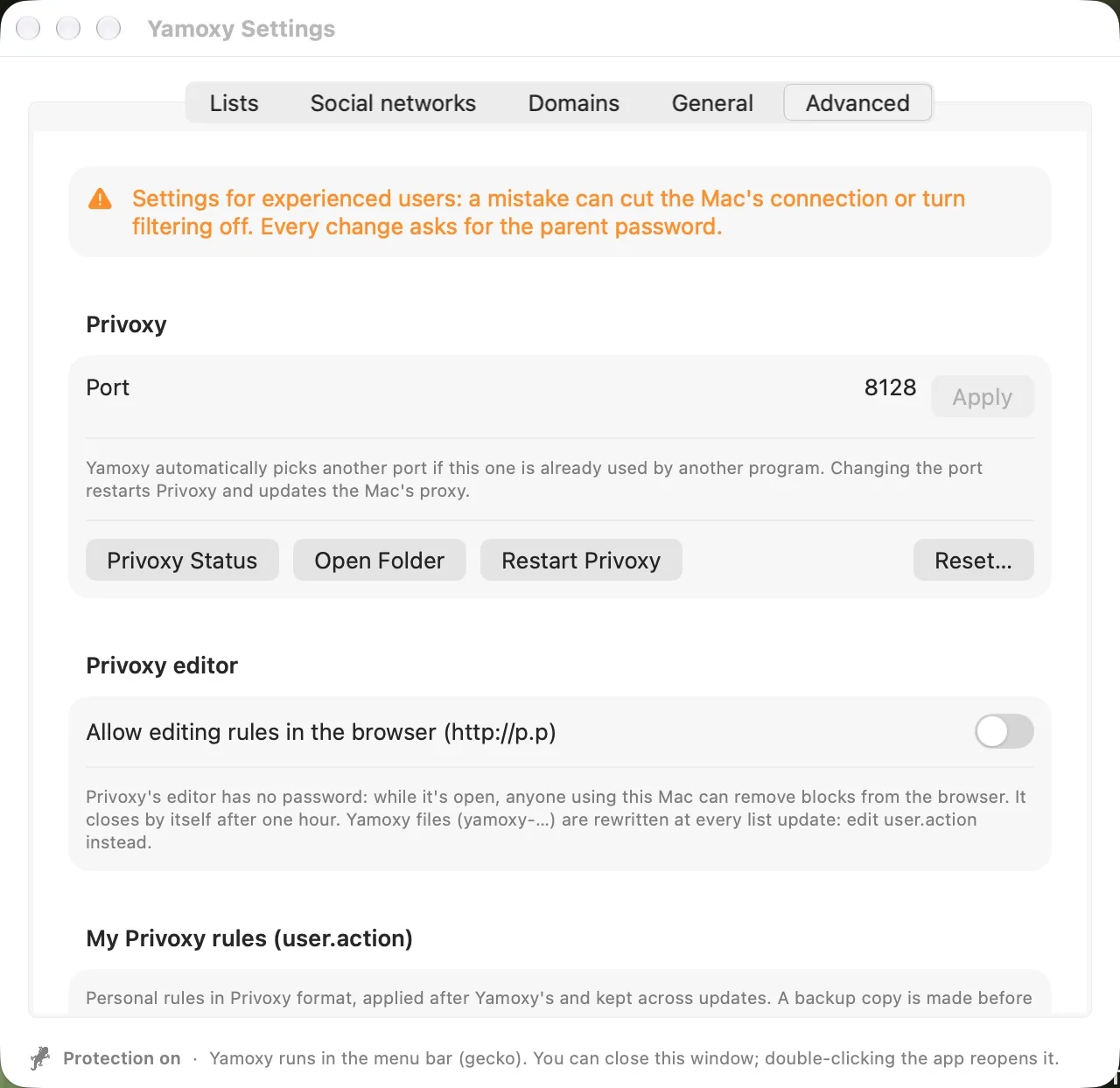
Advanced settings
Advanced tab. For experienced users. Parent password required.
- Port
- Picked automatically if busy. Can be changed by hand.
- Privoxy editor
- Edit rules in the browser. Closes by itself after 1 hour.
- user.action
- Your Privoxy rules. Checked before being applied.
- Log
- Records blocked sites. Open in Console, clear.
- Exclusions
- Domains that skip the filter (company VPN…).
- Troubleshooting
- Status, folder, restart or reset Privoxy.
Tips
For solid protection.
- A standard macOS account for the child, not administrator.
- A parent password.
- Open at startup turned on.
- Bypass tools category ticked: it blocks VPNs and proxies.
- Cut internet when Yamoxy is closed (section 7).
- Firefox: proxy locked (section 7).
- A look at the monitor now and then: it reports unexpected stops.
Limits
Yamoxy makes getting around it hard, not impossible. What it doesn't cover, and what to do about it.
| Limit | What to do |
|---|---|
| Administrator account. The child can undo everything: proxy, settings, uninstall. | A standard account for the child. Keep the administrator password to yourself. |
| VPNs, VPN extensions, Tor. A VPN app already installed, a VPN or proxy extension in Chrome, Edge or Brave, Opera's built-in VPN, Brave's Tor windows, Tor Browser. | Bypass tools category: it blocks downloading them and most of these services. macOS Screen Time to limit apps. |
| Apps that ignore the proxy. Some games and messaging apps connect directly. | Screen Time: System Settings → Screen Time → App Limits. |
| Force quit. Filtering goes on, but social network schedules stay frozen until Yamoxy restarts. | The monitor reports it. With Cut internet, the child gains nothing from it. |
| Yamoxy's files. Settings are in the user's folder. A savvy child, in that account, can change them. | No complete answer today. It takes technical knowledge; the parent password protects the app, not its files. |
| Other accounts on the Mac. Yamoxy filters while it's open in the session. | Open Yamoxy in each account to protect. |
| New connection (iPhone over USB, network adapter). | Check the gecko. If needed: General → Proxy → Set up. |
Common problems
Uninstall
Two ways, same result.
- On the
.dmg: double-click Uninstall Yamoxy. - In the app: General → Uninstall Yamoxy…
The filter is removed, settings deleted, the app moved to the Trash. The parent password is required; if it's forgotten, a Mac administrator's password is enough.
Privacy
Your data stays on your Mac.
- No personal data is sent.
- Connections: downloading lists and checking GitHub for updates.
- Log and monitor: on this Mac only.
Yamoxy is free software (GPL v3). Questions and ideas: Send Feedback… or GitHub. Project: mizuki.ch.
Social networks and schedules
Social networks tab. One setting per network: TikTok, Instagram, YouTube, Snapchat…
The badge shows the current state: blocked now or allowed now. When a slot starts, open tabs are cut.